Security and moderation · · 4 min read
Your account and your data: download it, log out everywhere, delete it
Your account is yours, and so is what we know about you. Malta Living keeps the tools for both in one place, the phone's Settings, so you can download your data, log out where you need to and ask for your account to be deleted without writing to anyone first. Here's each one, and what happens when you tap it.
Signing up
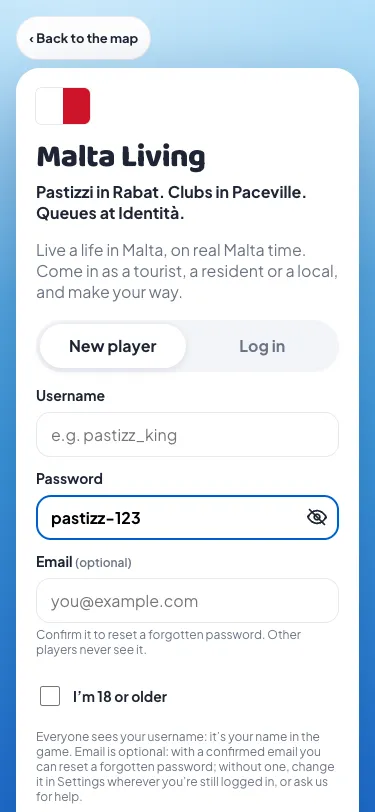
Signing up takes a username, a password and a tick: "I'm 18 or older", because Malta Living is an 18+ game. Email is optional. With a confirmed email you can reset a forgotten password; without one, you change it in Settings wherever you're still logged in, or ask us for help. Other players never see your email.
Every password box in the game has an eye on its right: tap it to see what you typed, tap again to hide it. It starts hidden. It's a small thing, added after we watched a new player struggle to type a password they couldn't see.
Download your data
Settings › Your account data › Download my data gives you a file with everything we keep about you:
- your account, your game and its money;
- your messages, including your Team chat and feedback;
- your Gossip posts, comments, reactions and the tags of you;
- your notification settings and devices (which push service, not the device's address);
- your purchases, invites, the jobs you posted or did for other players, activity counts and crash reports.
Other players appear in it only by username. Under the EU's GDPR, the right of access means you can ask any company for this; we'd rather you never had to ask.
Log out, or log out everywhere
Log out, at the bottom of Settings, logs you out on the phone or computer you're using. Your others stay logged in, so closing a session on a friend's laptop doesn't throw you out at home.
Log out everywhere is for when you think someone else is in your account. It asks first, then logs you out on every phone and computer, this one too. The other devices see "You were logged out" the next time they do anything. The confirmation also tells you to change your password (Settings › Change password), because that's what stops someone who knows it from logging back in. Changing your password logs out your other devices as well.
Delete your account
Settings › Request account deletion. Our team checks it's really you, then deletes your account, all your lives, your messages and what you own. Other players keep their own money and messages. We aim to do it within 7 days, and always within a month.
If you only want a fresh start, you don't need to delete anything: starting a new life keeps your account and lets you begin again as a tourist, a permit holder or a local.
Top-ups ask first
Game euros you buy arrive in your Bank the moment you pay. EU law gives you 14 days to cancel most online purchases, but not digital content you asked to have straight away. So the top-up sheet now has a box above the packs that's never ticked for you: "I want it now. I understand I lose my 14-day right to cancel once it's in my Bank." No pack can be bought without it, and the payment page and receipt say the same.
Game euros can't be cashed out, and euros you bought are for things in the game: the Casino, MaltaBet and the Lottery House take only euros you earned playing.
What we keep, and for how long
The Privacy page lists every kind of data with how long we keep it. Most of it stays until you delete your account; notification texts and crash reports go after 30 days. A reported message and the five either side are kept only while the report is open, unless it's a child-safety report, which an admin reviews before it's released (how reports work).
All of this sits in your phone's Settings, at the end of the phone's apps. New here? Read what Malta Living is, or play Malta Living free.
Questions people ask
How do I download my data from Malta Living?
Open Settings on the game's phone, then Your account data › Download my data. You get one file with everything we keep about you.
Someone else is in my account. What do I do?
Settings › Log out everywhere, then Settings › Change password. That logs out every device and stops them logging back in.
How long does deleting my account take?
We aim for 7 days, and always within a month. The team checks it's you first.
Do I need an email to play?
No, it's optional. With a confirmed email you can reset a forgotten password yourself.