Guides · · 2 min read
Bald, Shaved and twelve skin tones in Malta Living
By The Malta Living team · Updated
Skin tones in a life sim are easy to skip past, but they're one of the first things you choose, and players told us the game didn't have enough of them. Since 20 October Malta Living has twelve, from very light to very deep, and two new hairstyles that players asked for too: Bald and Shaved. You can set them when you start, or any time after.
Your character's look is made of a body, a hairstyle with its colour, the clothes you wear and a skin tone. This update adds to the hair and the skin.
Bald and Shaved
Bald gives you a clean scalp. Shaved gives you a light shadow of stubble. They're hairstyles for any body: pick either on the man's body or the woman's.
You'll find them on the Hair tab when you sign up. In the game, open your profile and tap Change your look.
Twelve skin tones
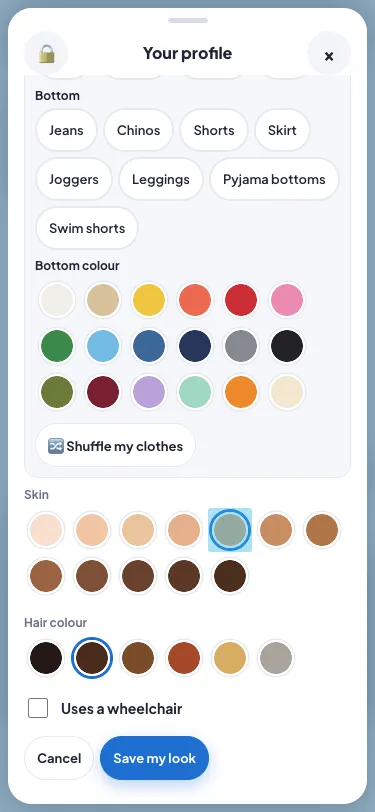
The list runs from light to dark:
- Very light, Light, Light olive and Medium-light;
- Olive, Medium, Tan and Medium-dark;
- Brown, Dark, Deep and Very deep.
You pick one on the Colours tab. A new character still starts on Light, and Very light is there for anyone who wants the palest look on offer. Every outfit is drawn for every tone, so nothing looks pasted on, whatever you wear.
People in Malta come from everywhere, and now every player can look like themselves. For a general read on why skin colour varies so much, the Wikipedia article on skin colour is a good start.
Change your look, in tabs
Changing your look got easier at the same time. Change your look has tabs now, Body, Hair, Clothes, Colours and Swim, the same as when you sign up, with your character big above them the whole time. Drag to turn yourself round, and every tap shows on you at once. Undo takes back the last change, and Cancel asks before throwing changes away. One Save keeps your look and your swimwear.
Nothing changes for looks you already have
The five tones from before keep exactly their colours, so nobody's character changed when the update went out. If you liked your look, it's still yours.
Where to go next
Clothes have their own rules at some places: dress the part explains the dress codes, and what dressing well gets you. To make your home look like you too, see Buy mode. Change your look is on your profile, which you open from your phone. The full picture of what the game covers is in the Malta life simulator guide. To try the new looks yourself, play Malta Living free in your browser.
Questions people ask
Can I change my skin tone later?
Yes. Open your profile and tap Change your look, then the Colours tab. You can pick a new tone or hairstyle there any time.
Are Bald and Shaved open to both bodies?
Yes. Both hairstyles work on the man's body and the woman's body.
Will my current look change?
No. The five tones from before keep their colours, and your look keeps its tone.
Which skin tone does a new character start with?
Light. The other eleven are on the Colours tab, from Very light to Very deep.