
Guides · · 3 min read
Choose a story without losing your place
You can choose a story in Malta Living straight from the reminder beside your current step. Tap Switch to see the stories available to you. Pick a different adventure, or return to one you have already started.
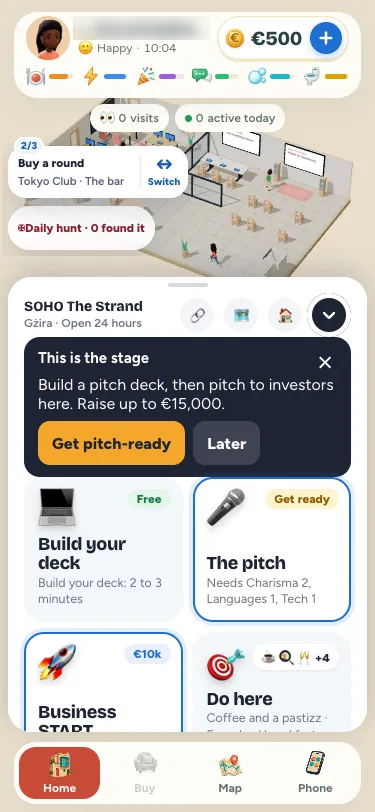
Your saved steps stay where you left them. Switching the reminder does not finish an activity, award a bonus, buy anything or start a journey. It simply changes which existing story you follow.
A little choice, close to the game
Perhaps you are following Your first investor and breakfast at SOHO has finished for the morning. You can leave that step saved and follow another available story. When you come back, the investor story still remembers your earlier work.
The chooser shows each story’s name, saved step and next activity. Your current choice has a blue ring. Tap that current story to open its full overview, or use View all stories to return to the familiar Stories page in Earn.
The compact world reminder shows the next activity and location on two lines, with a small progress badge at its top left. Tap the activity to open it or its destination. Tap Switch to choose another story. Hide in the chooser dismisses the reminder.
Existing adventures, existing rules
This is a faster entrance to the stories already available on your account. It does not refresh the daily selection or bring back a completed story early. Story rewards, activity costs, opening hours and completion checks keep their existing rules.
The same polish makes Founders’ breakfast clearer: the activity shows 08:30–10:00 Malta time, including its closing time. Coffee and a pastizz remain a separate choice. These are the game’s activity hours; check a venue’s own information for a real visit. Visit Malta has information for exploring the islands outside the game.
For more ways to play, read about daily missions and earning, playful Wishes and friends and clubs. New here? Start with the Malta life simulator, or play Malta Living free.
You can use the reminder at your current venue or while planning where to go next. If the required activity is here, tapping its name brings up that activity at the right spot. If it belongs somewhere else, the usual destination flow helps you get there. Read the activity’s current price and availability before starting it. Choosing a different story first gives you room to decide what suits your time and needs.
Long activity and venue names stay on two separate lines. Their visible labels may shorten on a narrow phone, while the story’s full overview lets you read the complete next step. The small badge shows your position in that story, so a three-step adventure and a four-step adventure each show their own progress.
If you want to clear the reminder from the scene, open Switch and choose Hide. The reminder returns for the next step or the next day. You can also find your stories through Phone, Earn and Stories. The shortcut gives you another convenient entrance while keeping that familiar route available.
Questions people ask
Does switching the followed story reset it?
No. Each story keeps its saved progress. Choosing it again returns its reminder to the saved next step.
Does choosing a story start travelling?
No. You still explicitly choose the next activity or journey from its usual button.
Does the chooser give me new stories?
No. It lists your existing unfinished stories. The normal daily selection and completed-story rules still apply.