Behind the scenes · · 3 min read
Get around: find your next place in Malta Living
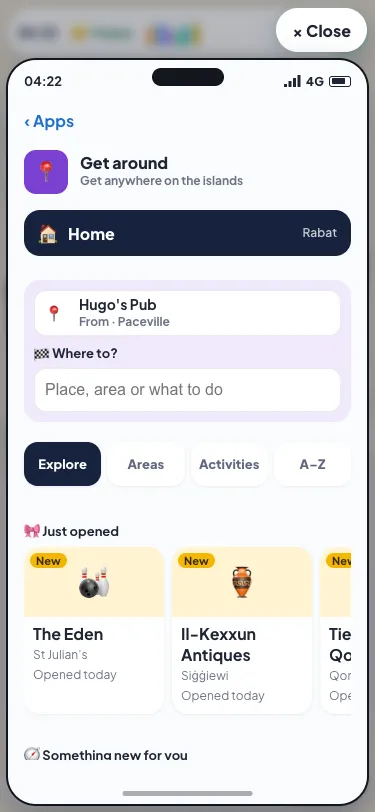
Looking for places to go in a Malta game that feels like the real island? Malta Living already has more than sixty, and the bigger map has 38 more on the way. One long list stopped being a good way to choose. So Get around, the phone app you use to travel, now helps you decide where to go, not just how to get there.
Four tabs
Home still has its own button at the top, and the search sits under it. Below them are four tabs:
- Explore is for when you don't know what you want. It shows what's just opened, where your friends are, a place you've never tried, every place nearest first, and the places coming soon.
- Areas lists places by area: Valletta, Sliema, St Julian's, the South and the rest.
- Activities lists them by what you can do there.
- A–Z is the plain list.
Get around remembers the tab you used last, so if you always pick by activity, that's where it opens.
Your friends are here
If a friend is out somewhere you're allowed to see, Explore shows them: "Ana and Joey, The Eden · Join them". Tap the row and the trip is planned. It follows the same privacy rules as the rest of the game. If someone has turned off "Show where I am", or blocked you, they're not there. And it never shows anyone's home.
Something new for you
Explore also suggests the nearest place that's open right now and that you've never been to. New places you haven't visited get a small blue dot in every list for their first 30 days. The dot is all you get: no notes, no pop-ups.
Pick by what you feel like
Activities has seven tiles: Eat, Drink, Play, Sea, Learn, Earn & money and Date night. A place sits under every one it offers, so a pub with darts is under Drink, Play and Date night. Each row says what's on the menu, in the place's own words. An eighth tile, Risky, only appears once you've tried a risky move yourself, so it never greets a new player.
We don't sort places into activities by hand. The game works it out from what you can actually do at each one, so when a new place opens, it lands in the right tiles by itself.
Look before you go
Tap a place and, before you pick how to travel, you see whether it's just opened, which friends are there, whether it's a date spot, its rooms and its menu with prices. It's what a real place serves: a beach bar has cocktails and a burger, not pastizzi.
Questions people ask
Where did the area tabs go?
They're under the Areas tab now. Explore still has every place, nearest first, under its own rows.
Why can't I see the Risky tile?
It shows once you've done a risky move. Until then, the game doesn't push it at you.
What does the blue dot mean?
The place opened in the last 30 days and you haven't been yet. It goes as soon as you visit.
Can my friends see where I am?
Only if you let them. "Show where I am" in your settings decides it, as it does everywhere else in the game. Play Malta Living free and see what's near you. New here? Start with what Malta Living is.