Guides · · 3 min read
Fix a typo in your Gossip post
Until now a post in Gossip could only be deleted, so one typo meant starting again. In Malta Living, the free life sim you play in your browser, you can now edit a Gossip post or reply for 15 minutes after you write it.
Edit, with the time left
Tap the ⋯ on your own post or reply. You'll see ✏️ Edit, with how many minutes are left, and 🗑️ Delete under it. Change the words and tap Save. You can edit up to 5 times. After 15 minutes only Delete is left, so a post can't change after it has earned likes and replies.
It says Edited, and the old words are one tap away
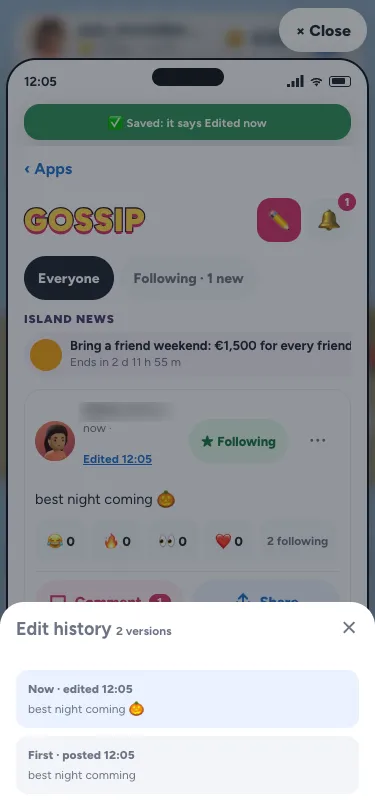
An edited post or reply says Edited 23:52. Tap it and everyone who can see the post sees what it said before: the words as they are now, then each earlier version. Nothing is hidden: that's what keeps an edit honest.
What stays the same
Likes and replies stay, and the post keeps its place in the feed: an edit never bumps it back to the top. An edit tells nobody, except that an @name you add is told once, the way a new tag would be. Replies written before the edit say before the edit, so a joke about a typo still makes sense.
Editing a reply
A reply works the same way: tap the ⋯ on your reply, choose Edit, and fix it within 15 minutes. Replies are 200 characters, as they always were, and an edited reply says Edited too. If you wrote a reply to a post that was then edited, your reply says before the edit in quiet letters, so anyone reading knows which version you were answering. That keeps a thread honest when the words underneath it have changed.
Why only 15 minutes
Fifteen minutes is long enough to fix a typo, add a forgotten word, or take out something you didn't mean. It isn't long enough to turn a post that earned a lot of likes into a different post, which would be unfair to the people who liked the first one. If you need longer, Delete is always there, and you can write it again.
The same rules as a new post
An edit goes through the same checks as a new post: no phone numbers, emails or links, the word filter, the length limit, and a limit on how often you can edit. A post that moderators have hidden or removed can't be edited, and a report keeps the words it was made on.
Why it matters
Gossip is where the island talks, and small mistakes shouldn't make you delete a good post. Read more about clubs, friends and Gossip and the phone's apps. New here? Start with the Malta life simulator guide. For good habits online, see Get Safe Online.
Questions people ask
Can I edit a Gossip post after I post it?
Yes, for 15 minutes, up to 5 times. Tap ⋯ on your post, then Edit.
Will people know I edited it?
Yes. It says Edited with the time, and anyone can tap it to see what it said before.
Do my likes and replies disappear?
No. They stay, and the post keeps its place in the feed.
Can I edit a reply?
Yes, in the same way and for the same 15 minutes. Replies are 200 characters.