Guides · · 3 min read
Where is everyone? The player heatmap in Malta Living
The quickest way to find players in a life sim is to go where they already are. Malta Living, the free life sim of Malta you play in your browser, is one shared island: every player walks the same streets at the same time of day. The heatmap shows where they've been lately, so you can head for the crowd instead of an empty beach.
Opening it
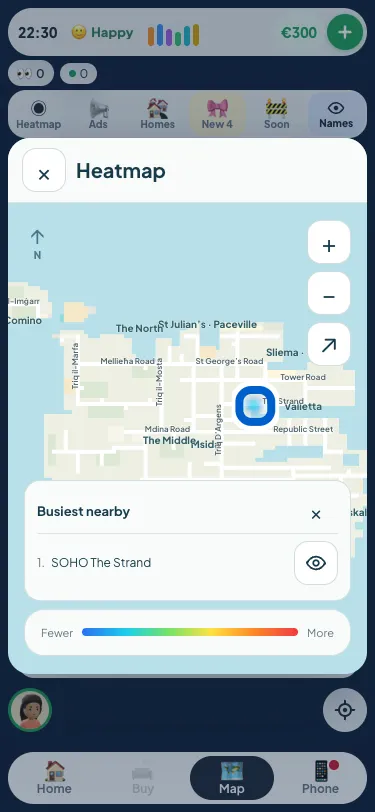
On the Map tab, the row of chips at the top has one called Heatmap. Tap it and a popup opens over the game map, drawn with only the streets and the coastline, no buildings, so the colour is all you see. Drag to pan, pinch or use the + and − buttons to zoom, and the arrow button shows all the islands at once. Close it with ✕, a tap outside it, Back or Escape, and you're back on the game map exactly where you were.
Reading the colours
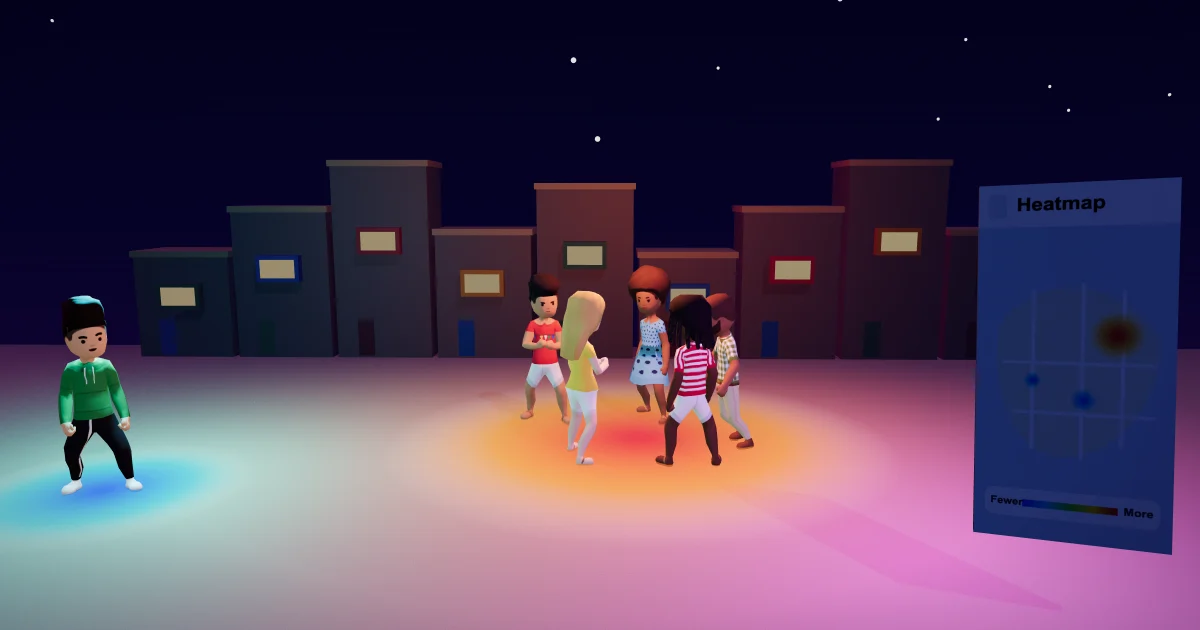
Blue means fewer players, red means more, and the scale at the bottom says so. The colour comes from players last seen at public places in the last five hours, so a red patch over the clubs of Paceville at midnight means people have been there this evening, not that they're all standing on the strip right now. Everyone sees the same picture, refreshed every five minutes. A lone player stays cool blue even on a quiet night, so a big red patch always means a real crowd.
Busiest nearby
Tap a patch of colour and a card lists up to four public places inside it, busiest first, with no numbers and no names: just the places. Beside each one is an eye. Tap it and the heatmap closes and the game map glides to that spot, so you can see the street and its pin. Your character stays where they are, and no trip starts until you tap Go there yourself. The bigger map post explains the rides, the walks and what each area has.
What it never shows
The heatmap is about places, not people. It never shows who is where, and it never shows homes: private homes, hotel rooms and visits to someone's house don't count, and neither do the island's own residents, who go about their day on the server, or accounts that have been closed. Only players at public places count, and only as a shade of colour on a street. If you'd rather know where your friends are, that's on their cards and in your chats, as the friends and clubs guide explains.
Why five hours, not live
A live map of where every player stands would turn the island into a tracker. Five hours of recent activity, in one shared snapshot, answers the question people really have, which is where a good place to be tonight is, without following anyone around. It also means a crowd that gathered at a bar an hour ago still shows, so a good evening doesn't vanish from the map the moment the first person goes home.
Once you're there
Walk in. Public places in Malta Living are never empty: the island's own residents are about, and real players show as faces you can tap. Say hello. Your first hello goes to a real player anyway, and most friendships start with one. On a Friday or Saturday night the heatmap usually points the same way, towards St George's Road and the strip, and the Paceville nights guide tells you what's open when you get there. The full tour of the game is in the Malta life simulator guide.
Questions people ask
Does the heatmap show where players are right now?
Not exactly. It shows players last seen at public places in the last five hours, in one snapshot that everyone sees, refreshed every five minutes. It's recent activity, not live positions.
Can other players see me on the heatmap?
Not as you. You're one shade of colour on a street along with everyone else there, with no name, face or count. Time at home, in a hotel room or visiting a friend never counts at all.
Why is the heatmap blue or empty?
Few players have been at public places in the last five hours, or they're spread out. A lone player stays blue on purpose, so red always means a crowd. Try again in the evening, when the island is busiest.