Guides · · 3 min read
Your game, any screen
You can switch devices in Malta Living without starting over. Open the game on your other screen and choose Continue here. The old screen pauses its gameplay controls and turns off its microphone. Your character, home and progress remain with your account.
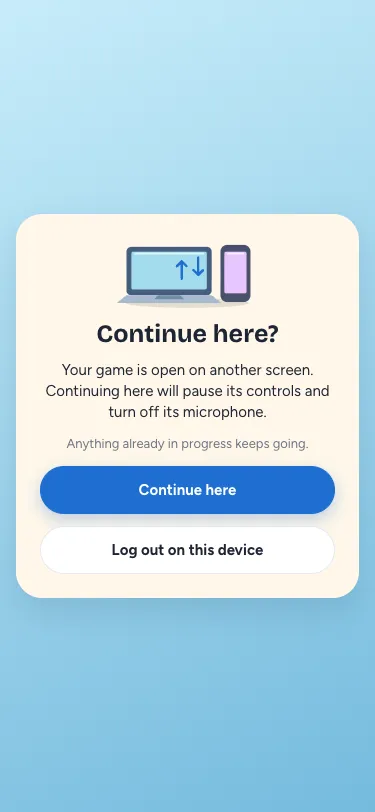
One screen in control
Opening the game on another phone, computer or browser tab asks before moving an active game. Until you confirm, the original screen stays in control. After a switch, that screen says Playing on another device. It can switch back when you choose Continue here again; it will not take control merely because you focus or refresh it.
Refreshing your active tab keeps control. If a screen was closed or disconnected for a while, the next one can recover its abandoned session.
Your activities keep going
Cooking, travel, a shift and other activities already accepted by the game continue on the server. Switching screens does not start them again or charge you again. Your new screen asks for the current state, so it shows where things stand now.
At a home party, the old device’s microphone and voice connections stop. Choose your microphone settings again on the screen you move to. Your phone apps and account and data stay yours.
Signing out stays separate
This controls where you play. It does not sign every device out. Use Log out on this device to leave this browser, or Settings → Log out everywhere when you want to end the other sign-ins too. Do not share your password.
For the wider game, start with our Malta life simulator guide, explore friends and Gossip, or play Malta Living. Browser microphone access remains under your own control; MDN explains microphone permission.
Questions people ask
Will switching screens interrupt the meal I am cooking?
An activity already accepted by the game keeps its place and its remaining time. You do not need to stop it to move from your phone to your computer. The new screen loads your current activity rather than buying or starting the same thing again. The same applies to an accepted trip or shift. Only confirmed progress is shared: finish an unsubmitted move or send a message before switching, rather than expecting an unfinished local draft to appear on the other screen.
Why does my phone ask again after I continued on my laptop?
The laptop now has control. Your phone stays signed in, but focusing it will not pull the game away from the laptop. Choose Continue here on the phone when you actually want to return to it. You can move between the screens as needed; there is no device-switch charge. If two screens try to continue together, only one confirmation can win. The other screen asks again instead of both being allowed to move your character at the same time.
Does continuing on my computer enable its microphone automatically?
No. Moving the game closes the old screen’s microphone and its voice connections. The new screen starts with its microphone off, even if you had been talking at a party. Open the voice controls when you want to talk there, and allow microphone access if your browser asks. That permission belongs to the device and browser you are using. It is separate from your game sign-in, and changing screens is never permission to capture audio on another device.